GUSender

A CNC sender for grblHAL controllers: run from the controller web page, use the standalone desktop companion for network or USB machines, preview toolpaths, probe work offsets, test workpiece rotation, and control a guarded phone pendant through MQTT.

v0.7.6
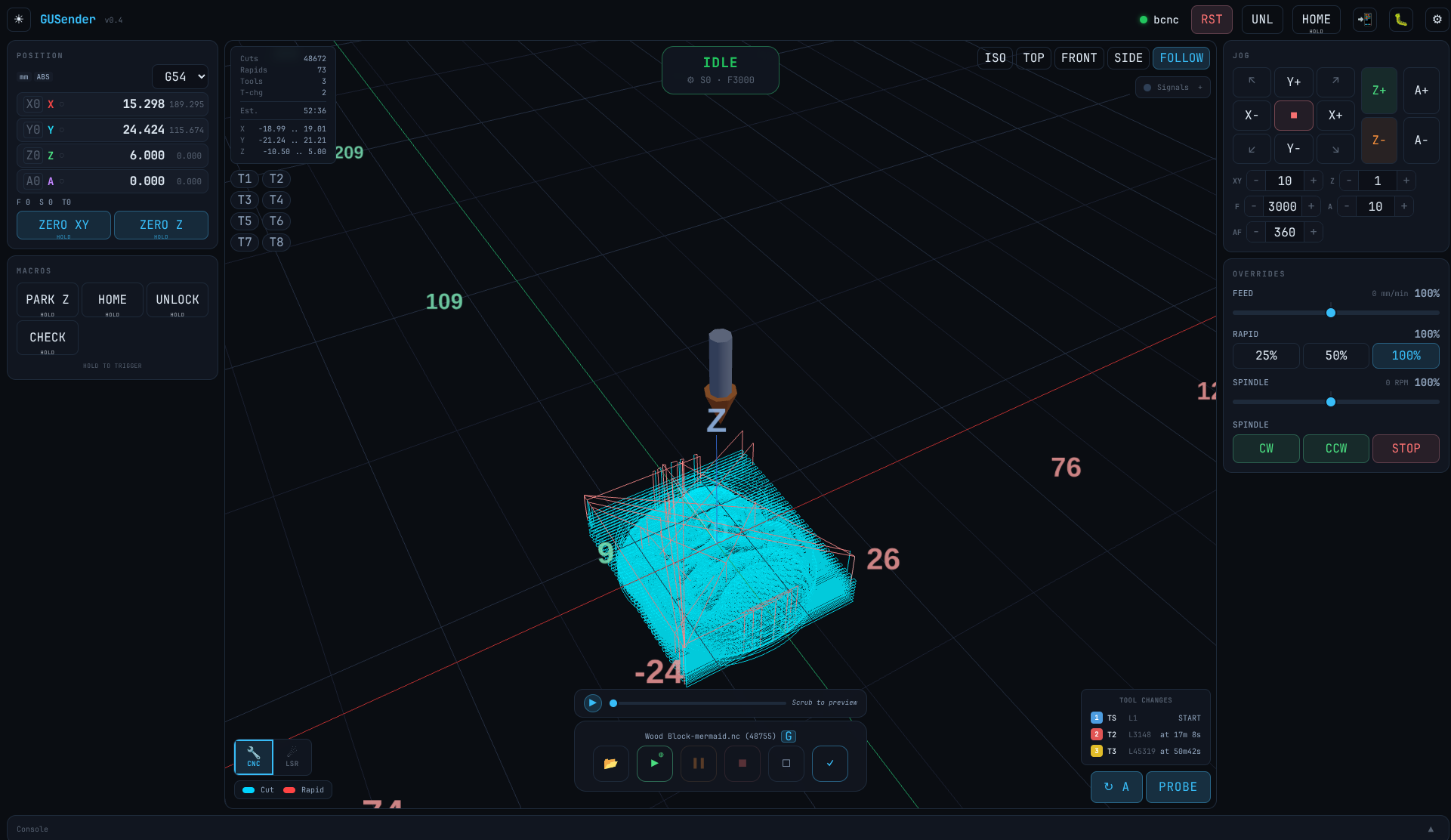
GUSender — 3D toolpath viewer with DRO, jog controls, and live tool position
v0.7.6 rotation test release

The new grblHAL rotation flow measures an angle, arms it for the next job, applies it only when the job starts, syncs the armed state to observers and MQTT, and blocks unsafe probe moves while firmware rotation is active. The D1S installer below bundles the latest STM32 firmware build for tester machines.

📦 grblHAL Generic FlexiHAL and other grblHAL networking controllers grblhal-generic-0.7.6-r722c991.zip 📦 ESP3D / HiMill D1S ESP3D-based controllers esp3d-d1s-0.7.6-r722c991.zip 📦 D1S Installer + Firmware For D1S rotation-test machines; includes sender installer, latest grblHAL D1S firmware, ESP3D firmware, and launcher scripts gusender-d1s-installer-v0.7.6-r722c991.zip D1S Firmware Source Open-source grblHAL STM32F1xx D1S firmware tree github.com/gyordanov/STM32F1xx 📦 Desktop Companion — Linux Standalone app for network proxy and USB serial machines gusender-desktop-linux-amd64-v0.7.6-r722c991.zip 📦 Desktop Companion — Windows Standalone app for network proxy and USB serial machines gusender-desktop-windows-amd64-v0.7.6-r722c991.zip 📦 Desktop Companion — macOS Universal app build for Apple Silicon and Intel Macs gusender-desktop-darwin-universal-v0.7.6-r722c991.zip

Controller zips contain a 4 KB loader, the app bundle, and a README with step-by-step installation instructions. The D1S installer bundles sender setup, firmware, flasher scripts, and the rotation-test grblHAL build. The desktop companion is optional and runs the same sender with a local network/USB facade.

How it works

GUSender can live on your CNC controller. A tiny loader file (4 KB) is stored on the controller's storage. When you open the controller's IP in any browser, the app loads instantly from cache (or downloads once on first visit), your machine config loads from the controller, and it auto-connects.

For machines that are not networked, or when you want a native app shell, the desktop companion runs the same sender with a local HTTP/WebSocket facade. It can proxy a network controller or present a USB serial machine as a sender-compatible localhost machine.

Config, macros, probe settings, and MQTT options travel with the machine profile. Set up once, connect from a browser, the desktop companion, a tablet, or a phone pendant.

1

Install

Copy two files to your controller's storage. Takes about 2 minutes.

2

Open in a browser

Type your controller's IP. The app loads instantly from cache after the first visit.

3

Run jobs

3D toolpath, jog pad, probing, auto bed leveling, tool changes — everything's built in.

4

Add a phone pendant

Point a phone at the same machine URL. MQTT mirrors the sender and grants one active pendant at a time.

5

Use USB when needed

Launch the desktop companion for USB serial machines or as a localhost proxy for network controllers.

Features

Built for serious CNC work: live position tracking, full job execution, probing, leveling, tool changes, observers, phone pendant control, and a standalone companion app when the controller cannot host everything itself.

Machine Control

  • Live DRO with work and machine coordinates
  • Per-axis zero, Zero XY / Zero Z (hold-to-trigger)
  • Jog pad with diagonals, adjustable steps + feed
  • Feed / rapid / spindle override sliders
  • Spindle CW/CCW/Stop, coolant flood/mist
  • Laser/CNC mode switching
  • Programmable macro buttons

3D Toolpath Viewer

  • Real-time 3D visualization of loaded G-code
  • Rapids in red, cuts in cyan, completed in green
  • Live tool position marker during jobs
  • Rotary / 4th-axis with cylinder wrapping
  • Virtual playback scrubber
  • Tool isolation — highlight one segment

Job Execution

  • Stream G-code over WebSocket with flow control
  • Run jobs from SD card with live progress
  • Start-from-line resume after a stop
  • Job framing — trace bounding box first
  • Duration and time-remaining estimates
  • Large G-code text preview stays responsive with virtualized rows

Probing

  • Z, X, Y, XY, and XYZ probing
  • Shared active-probe model for 3D probes and touch plates
  • Center bore and boss probing
  • Split rectangular stock center: Center X and Center Y in separate clamp-safe passes
  • Workpiece rotation measurement, job-start application, and clear guardrails
  • Touch probe verification before each operation
  • Phone pendant probe controls follow the sender's active probe

MQTT Pendant + Observer

  • Phone pendant mirrors DRO, job state, tools, and probe setup
  • Hold-to-arm grant with one active pendant at a time
  • Desktop controls lock while the pendant owns control
  • Heartbeat, Last Will, page-hidden, and inactivity release paths
  • Observer tabs mirror jobs and machine state, then take primary when needed

Desktop Companion

  • Standalone Linux, Windows, and macOS app builds
  • Network profiles fetch controller config by IP
  • Local HTTP/WebSocket proxy keeps sender settings simple
  • USB serial sender mode for non-networked machines
  • Desktop zoom controls for high-DPI screens
  • Optional built-in MQTT broker support is planned for the companion path

Auto Bed Leveling

  • Probe a grid across your workpiece
  • Bilinear interpolation on every G-code line
  • Export / import height maps (.xyz)
  • Pre-leveled G-code for SD card jobs
  • Visual height map with color gradient

Tool Changes

  • Automatic ack via grblHAL protocol
  • "TOOL CHANGE" status throughout the M6 sequence
  • Toolchange timeline with cut time per tool
  • Custom Z-zero G-code support
  • Safety alert when grblHAL toolchange coordinates are not configured

SD Card

  • Browse, upload, download, delete files
  • Upload via HTTP or YMODEM
  • Visualize before running
  • Desktop USB path can stream jobs without requiring controller networking

Settings

  • Browse and edit all grblHAL settings
  • Search by name, description, or option
  • Track changes and write individually or in batch
  • Full backup and restore (JSON)

Job Reconnect

  • Close your browser mid-job? Open it again.
  • Shows job name, percentage, time remaining
  • Amber bounds rectangle on the toolpath
  • Tool change timeline restored
  • Auto init when the job finishes

Supported controllers

FlexiHAL and other grblHAL controllers with networking (Ethernet / WiFi)
ESP3D / HiMill D1S with WebSocket interface
USB serial controllers through the standalone desktop companion
Any grblHAL controller accessible via WebSocket

Requirements

A grblHAL controller with WebSocket support (Ethernet or WiFi)
SD card or LittleFS for the app bundle
Any modern browser — Chrome, Firefox, Safari, Edge
Optional desktop companion for USB serial machines or localhost proxy workflows
Optional MQTT broker with WebSocket support for phone pendant and observer mode
Internet access for the first load (the offline fallback in the zip handles air-gapped machines)